
BuildSphere
EN
Sign in Create free account
Illustration with demo data

Last Planner · line of balance · PPC

A line of balance is a schedule. Lean is a method.

Master plan, constraints, weekly work plan and PPC, all in one project, with the budget and purchasing in the same place. The schedule you already have comes in through Excel, with its predecessors.

One person on the engineering team and one project free forever, no credit card · launch price until 12/31/2026: from R$ 69,90 per engineer, with unlimited projects and field crew

The whole cycle · one real screen per stage

From the master plan to the causes, without copying from one spreadsheet to another.

Last Planner is not a screen: it is a conversation that repeats every week. In BuildSphere the five stages use the same project data, so what you decide in one shows up in the next.

Watch the Friday meeting · 28 sIllustration with demo data
  1. 1

    Master plan

    The line of balance is the schedule.

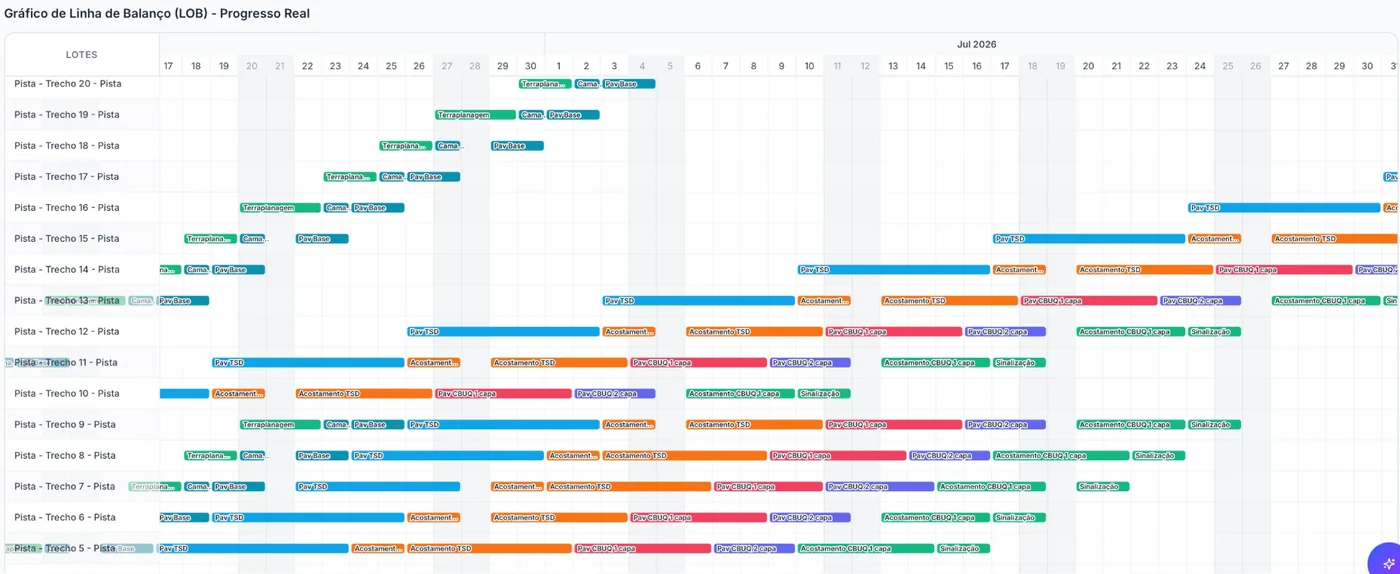
    The schedule you already have comes in through Excel with its predecessors, and each work package becomes a diagonal line climbing the floors at the project's pace. After that, the spreadsheet itself updates the network: when exported, it comes out with the predecessors column in the notation you already use (12, 12SS+4, 12FS-3), and whatever you change in that column comes back as a dependency. The Gantt and the line of balance are two views of the same plan.

    The line of balance of a demo project: each work package is a colored band advancing section by section
    The line of balance, with actual progress.
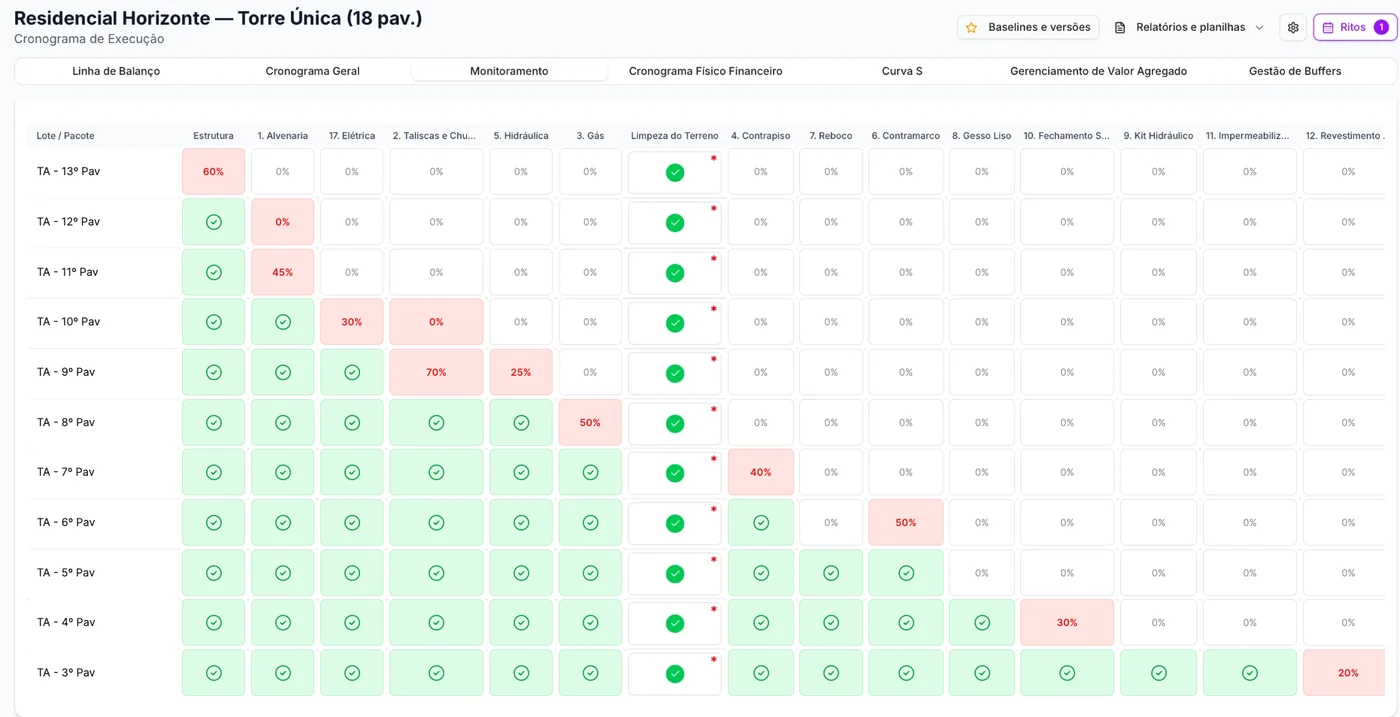
    The Residencial Horizonte monitoring matrix: floors in the rows, activities in the columns, completed in green and late in red
    The monitoring matrix: every activity, floor by floor.
  2. 2

    Constraints

    Whatever blocks the work front has an owner and a date.

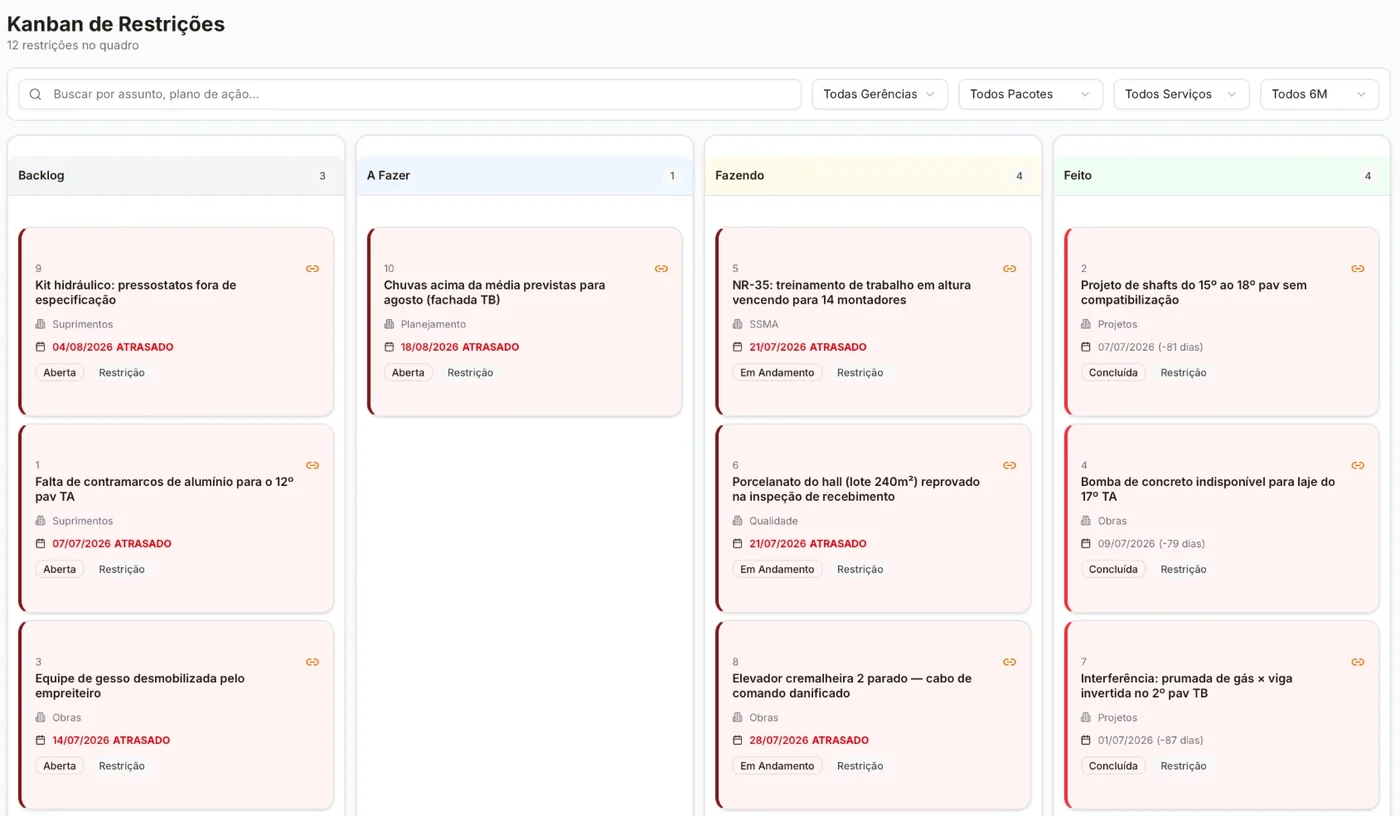
    Every constraint has an owner and a deadline. The owner is notified when it is assigned to them, three days before the deadline and when the deadline passes. Constraints sit on the constraint board, and on the project dashboard the overdue ones and the ones coming due appear side by side.

    In Work Front Preparation, each activity shows one signal for constraints, another for material in stock (based on the registered kits) and another for the crew.

    The Residencial Horizonte constraint board, in columns: backlog, to do, doing and done, each card with its area and deadline
    The constraint board, with area and deadline on every card.
  3. 3

    Weekly work plan

    The week comes out of the schedule.

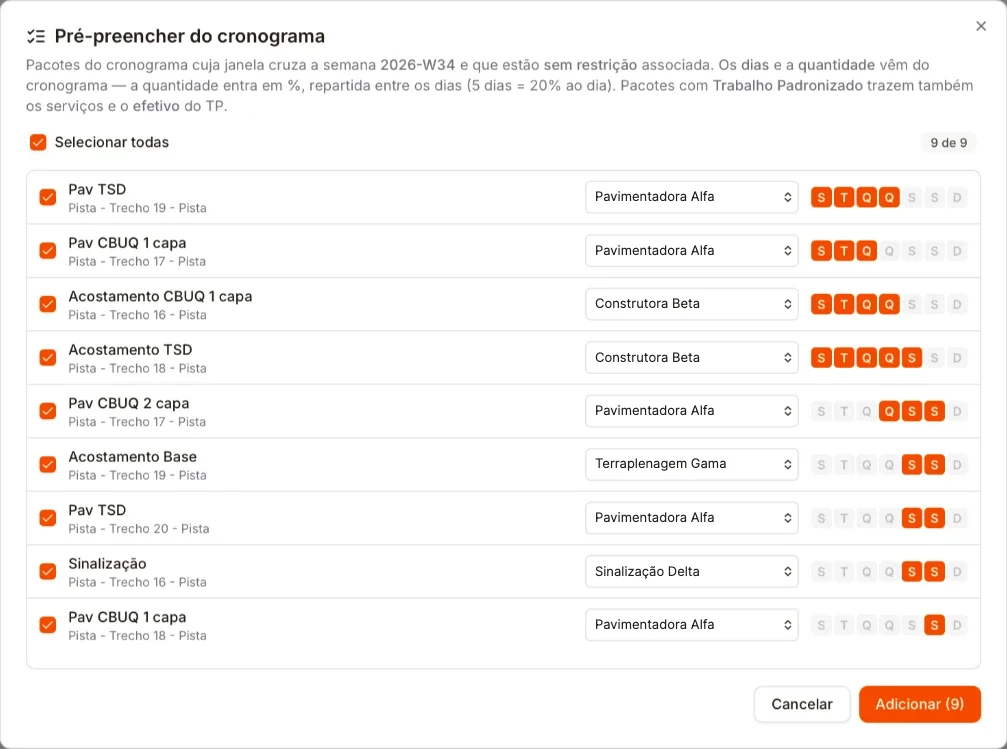
    Pre-fill brings in the work packages whose window overlaps the week and that have no open constraint. You uncheck what isn't going ahead, choose who does the work and publish. The printed sheet goes to the field.

    The weekly work plan pre-fill: nine work packages for the week, each with its subcontractor and days
    The week's Pre-fill: the packages without constraints, with who does each one and the days.
  4. 4

    PPC

    Of what you promised, how much you delivered.

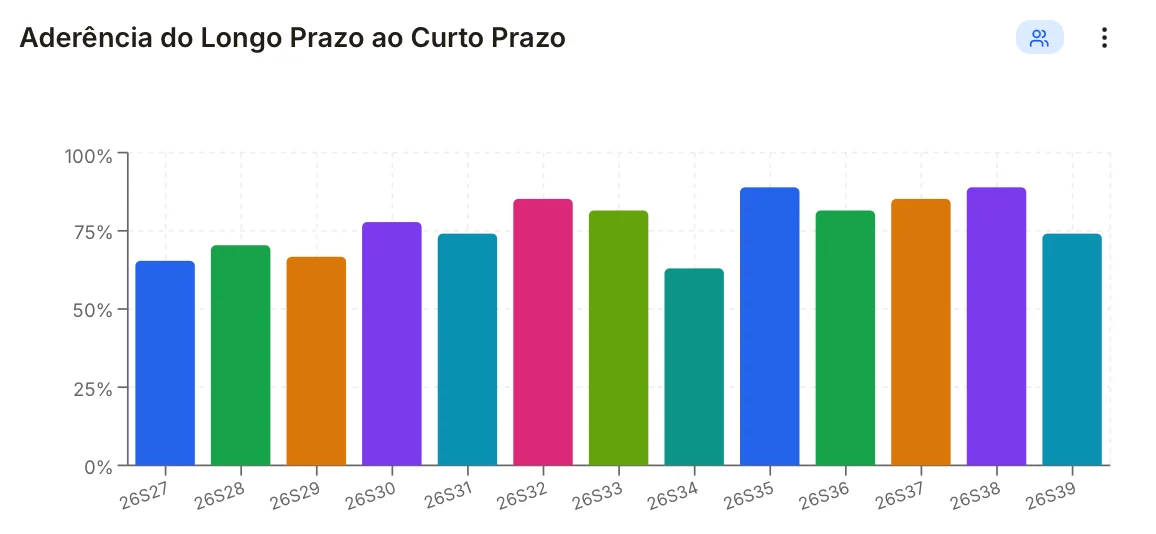
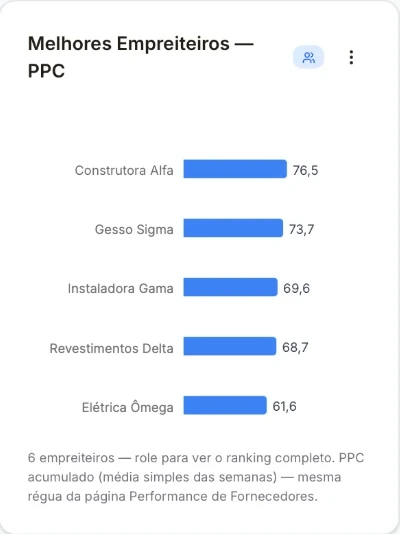
    The field check-out closes the week's PPC. Next to it are schedule adherence and the PPC ranking by subcontractor, and a week that closes below target alerts the project manager.

    The master-to-short-term adherence chart on the dashboard: one bar per week, from 26S27 to 26S39, all between about 60% and 90%
    Master-to-short-term adherence: of what the schedule put in the week, how much was scheduled.
    The PPC ranking by subcontractor on the dashboard: five subcontractors, from highest to lowest cumulative PPC
    The PPC ranking by subcontractor: the average over the weeks.
  5. 5

    Reasons for non-completion

    What didn't get done doesn't disappear.

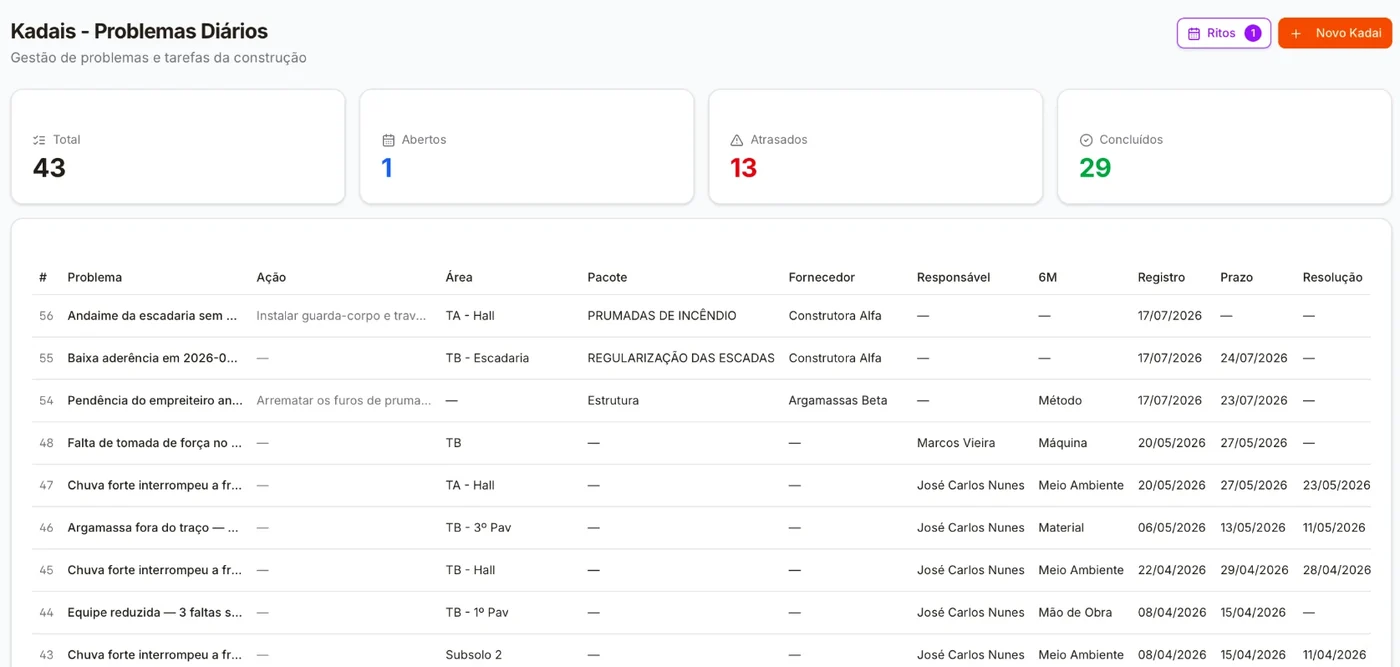
    Right on the day's grid, + Kadai opens the problem already filled in with the task that didn't get done: you enter the 6M cause and the action, and check the deadline. Anything unresolved after three days alerts the owner. Added up, the causes tell you what to tackle next week.

    The Residencial Horizonte kadais: 43 problems, 13 late, each with area, work package, supplier, owner, the 6M cause and the deadline
    The kadais, each with its 6M cause.

Two Senseis · the same name, two scopes

One explains the method. The other answers with your project's numbers.

On the free plan, the Sensei explains the method: PPC, constraint removal index, line of balance. From Genba up, it enters your project and answers with its numbers, showing where it got each one. On Kaizen, it also starts recommending what to do this week (beta).

Sensei · Aprendiz, Canteiro and Hanseiexplains the method

QuestionWhat is the difference between PPC and master-to-short-term adherence?

PPC answers: of what I scheduled, how much I completed. Master-to-short-term adherence answers: of what the schedule offered for the week, how much I scheduled.

They sit side by side because they look alike. A project can have a PPC of 100% and an adherence of 20%: it delivered everything it promised, after promising a fifth of what the plan called for.

  • PPC
  • Constraint removal
  • Line of balance

It doesn't read the project data: it explains how each number is obtained and interpreted.

Sensei · Genba and KaizenResidencial Horizonte demo

QuestionThe project delivered 29% of what it should have. Why did it fall behind and what do I do this week?

The delay isn't spread out, it is concentrated: three work packages account for almost all of it. Plaster Screeds and Grouting, Electrical and Masonry.

And the reason shows up in the constraints: of the 8 open ones, all 8 are already overdue.

From Genba up, it answers with the numbers above. On Kaizen (beta), it also recommends what to do:

This week, attack the 8 overdue ones first. They unblock the three work packages, and the rest of the front follows.

Source: delay ranking by work packageSource: 8 constraints · 8 overdueSource: project EVM

The Library · from Hansei up

The forms come already written.

FVS, FVM, acceptance criteria and procurement processes, ready-made and reviewed every six months. Writing fifty good forms takes weeks. Each form comes with the inspection items, the method and the acceptance criterion already written; you adapt it to your project before saving.

  • FVSservice inspection forms, item by item
  • FVMmaterial inspection forms, on delivery
  • Acceptance criteriawhat passes and what fails
  • Procurement processesready for the purchasing team

The template only pre-fills the fields: nothing is saved until you create the form. The six-monthly revision goes to the Library; the form you already use on site doesn't change on its own.

BuildSphere Academy · Shu · Ha · Ri

Learn before you sign.

The Academy is BuildSphere's training, in three tracks: Shu is the basics, Ha is the Lean the jobsite knows, Ri is the advanced level. The Ha track is the one for this page: Lean on site, Last Planner and line of balance.

Each section has pages, activities, a quiz and the module certificate; the whole track earns the level certificate.

The showcase is open. To unlock the pages, the quiz and the Academy's Sensei, a free account is all you need.

Get started

Bring the schedule you already have. Next week runs here.

Create a free account, upload the schedule from Excel and build your first weekly work plan. No credit card, no expiration date. When the project needs more, you pay per engineering team member, not per project, with launch pricing until 12/31/2026.

The intelligent way to build as one