Lean construction management with A.I. · for contractors and developers
See the whole project. With one yardstick.
Planning, costs, quality, logistics and the field in a single system, with an A.I. that reads your project and shows where it got every number.
One person on the engineering team and one project free forever, no credit card · launch price until 12/31/2026: from R$ 69,90 per engineer, with unlimited projects and field crew
 Watch the film, with narration · 2 min 34 sIllustration with demo data
The Sensei · Residencial Horizonte demo project
Ask your project.
It's not an assistant reading your PDF. It's fifteen fronts of the project, each with someone who understands it, querying the database at the moment you ask. That is why the answer comes with a source.
Read the answer as text
Residencial Horizonte — Single Tower: urgent attention, project off its planned pace
The picture in one sentence. The project is only 17.1% physically complete (EV ÷ BAC), with an SPI of 0.29 — in other words, it has delivered only 29% of what it should have delivered by today under the current baseline. That is a physical variance of -42 percentage points, a severe delay.
The numbers behind it.
- Physical progress: 17.1% — EV of R$ 8.67 million against a BAC of R$ 50.82 million.
- SPI: 0.29 — for every R$ 1 planned, only R$ 0.29 was delivered.
- Physical variance: -42 pp — the gap between what was delivered (EV) and what was expected (PV).
- CPI: no data — there is no approved progress measurement (AC is null); the actual cost is unknown, not zero.
- Average PPC: 47.1% — far below the Last Planner benchmark of 80%, "Critical".
- Constraints: 8 open, all 8 overdue — 100% of the open constraints are already past their deadline.
- Late work packages: 43 of 4,109 — 13,440 days of accumulated delay in total.
- Late activities: 1,395 — a high volume of tasks behind schedule.
- Milestones: 1 passed, 5 pending, 0 late — no milestone is formally late yet, but the pace is unsustainable.
What this means in practice. CPI cannot be calculated because there is no approved cost measurement — it is not possible to say whether the project is spending more than it delivers, only that physically it is delivering far less than it should. The 8 open constraints are all overdue — this is the most urgent and actionable bottleneck right now: someone needs to clear them today, not this week. A PPC of 47.1% shows that the weekly plan is not turning into execution — almost half of what is scheduled never makes it off the page.
Recommended decision. Today: press the owners of the 8 overdue constraints — they are the most direct brake on progress. This week: review why PPC is at 47% (what kind of problem blocks the most: supply, labor, design?). Urgent: approve the pending measurements to unlock the CPI — without that, no one can see the project's real financial health.
Do you want me to break down which constraints are overdue and which work packages account for the 13,440 days of delay? · 10 evidence items
Ask your project this question.
Create free account →Getting started · three steps
Bring the project you already have.
- 1
Create your account.
Free, no credit card. One person on the engineering team, one project and five people in the field, forever.
- 2
Bring the project you already have, via Excel.
Budget and WBS, schedule with predecessors, units, field crew and quality forms come in through spreadsheets. You upload them yourself, with no implementation consultants, and spreadsheets still go out to whoever only reads spreadsheets.
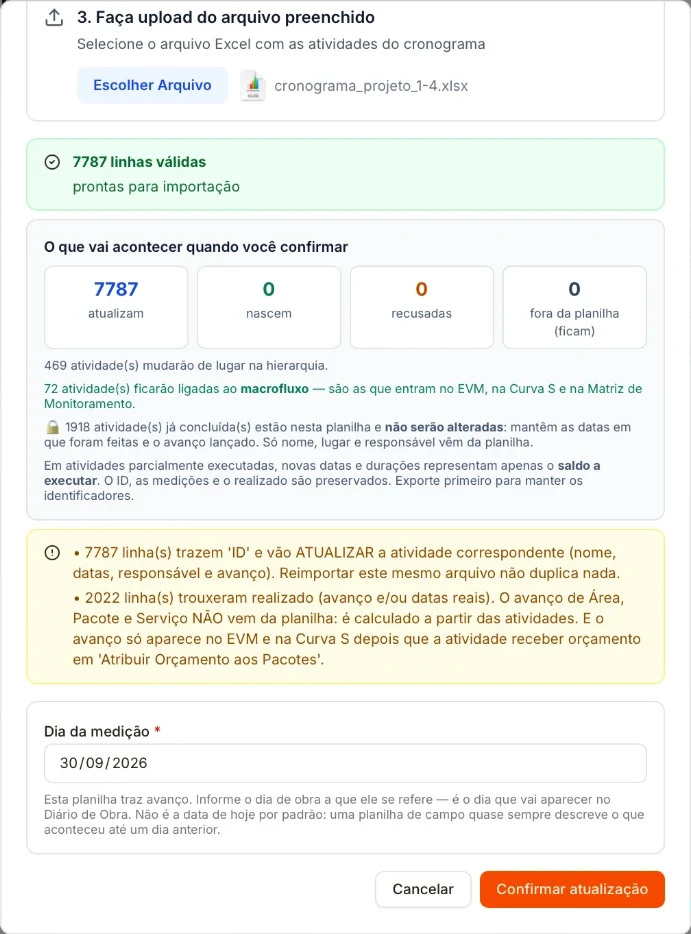
Before you confirm: what the spreadsheet is going to do.  Watch the spreadsheet become a line of balance · 20 sIllustration with demo data
- 3
The field crew joins by phone.
Check-in on arrival, check-out on what got done. Field crew members don't pay.
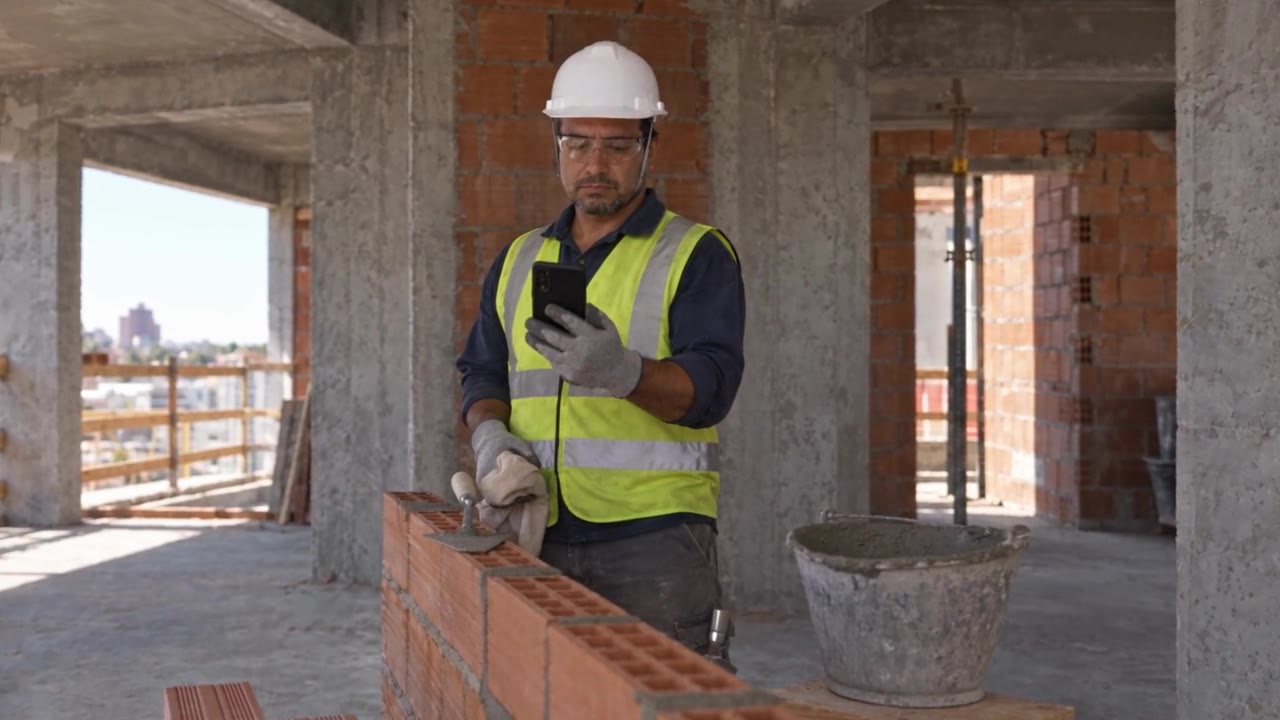 Watch the mason log his work and raise a warning · 23 sIllustration with demo data
Who it's for · five people, one project
Each one measures the project from a different place.
The owner sees the margin, planning sees the schedule, quality sees the form, logistics sees the material and the developer sees the buyer. BuildSphere gives all five the same yardstick.
-
Contractor owner or director
Margin and schedule slipping away with no one seeing the whole picture.
All projects in a single view, and the bill per person, not per project.
/quanto-custa → -
Project and planning manager
A schedule that doesn't talk to the field; overdue constraints.
Last Planner, weekly work plan and constraints with an owner and a date.
/last-planner → -
Quality
Forms on paper; measurements paying for work that was never approved.
FVS and FVM on the phone; the subcontractor is paid for what quality approved.
/campo → -
Procurement and logistics
Material sitting idle, or missing when the crew arrives.
Delivery scheduling, stock and consumables budgeted × consumed.
/logistica → -
Developer
The buyer calls to ask about the project; after handover, you lose touch.
A public progress link and a Resident Portal under your brand.
/portal →
Sheet 01 · The fragmentation
Budget, planning and quality don't talk to each other. That is why the project runs late.
Labor has always been a symptom of a bigger cause: the fragmentation of construction. Budget, Productivity, Planning, Logistics and Quality all speaking different languages. Everyone sees a part of the project, and no one sees the whole.
In BuildSphere: every module integrated, each governed by an agent that specializes in its subject, all speaking the same language, working to open up work fronts on site.
- Facial recognition at the gate
- Field check-in
- Headcount histogram
Sheet 02 · The compass
A line of balance is a schedule. Lean is a method.
Every piece of software says it does lean construction, and most only have a line of balance and a constraint kanban with a removal index. A line of balance is a schedule; lean construction is a way of managing — and a method does not fit on a single screen. BuildSphere was designed around it, and that is why it knows what to recommend: it was not trained to chat, it was built on a way of working.
In BuildSphere: the schedule and the weekly work plan are one and the same, and every constraint has an owner and a date and shows up before it blocks the work front. The project at the right pace.
- WFP
- Gantt
- Line of balance
- Takt Planning
- Look Ahead
- PPC
- L6
- QTO
- FMEA
- SWP
Sheet 03 · The ruler
The ruler has no opinion. It measures.
A flow that does not talk to itself: the next activity starts without respecting the completion of the one before. The measurement pays for rework, the progress on site does not match the progress in planning, the activity was scheduled without the material on site. Each area measures its own way. The field says it can be paid, quality says it cannot — and the one who suffers is the project leadership.
In BuildSphere: a single standard of measurement, the productivity in the budget is checked in the field, the master plan is broken down into the short-term plan, and what the subcontractor was paid is what quality approved. One hundred percent without an approved form is not one hundred percent.
- S-curve
- Earned value
- Unit rate
- Forecast overrun
- FVS
- FVM
- Test control
- Non-conformance
Sheet 04 · The crane
The right material, on the right floor, before the crew arrives.
Money sitting idle on site, rusting alongside the steel that was overbought. Tiles sharing space with concrete formwork. Logistics is only useful when the right material is on the right floor before the crew arrives. Building is sequence.
In BuildSphere: logistics made simple, kit and stock management, consumables budgeted × consumed, a supply board and site layout management.
- PFEP
- Bill of materials
- Kit per floor
- Inventory management
- Consumables control
- Delivery scheduling
Sheet 05 · One project, on a single drawing
The democratization of Lean Construction.
High-level tools, cutting-edge technical knowledge across several disciplines, and the knowledge to integrate it all. Something only large contractors could have, with a first-rate consulting team.
That is why BuildSphere-ai already comes with an agentic team connected to a state-of-the-art system. It is Tier-1 technology for the price of a basic tool.
The fronts · fifteen, one database
From the budget to the keys in the resident's hand.
The fifteen fronts don't live on fifteen separate screens: it is a single project, and that is why the answer comes with a number instead of generic advice. Each front has a question it knows how to answer.
- 01PlanningLast Planner, weekly work plan and the constraint removal index.“Which activities are past their date and still not closed?”
- 02BudgetWBS, unit cost breakdowns and the ABC curve of what is still uncontracted.“Which package costs the most and still has no contract?”
- 03CostsMeasurement sheets, earned value and the forecast overrun, package by package.“Where am I going to overrun the budget?”
- 04LeanHelp chain, visual management, kaizen and daily management.“How do I set up the help chain?”
- 05ProductivityUnit rate by activity, time study, Yamazumi and headcount histogram.“Since when has my masonry unit rate been getting worse?”
- 06LogisticsKit per floor, consumables budgeted × consumed and material demand.“What is going to run out next week?”
- 07QualityFVS and FVM, non-conformances and ranking by supplier and by material.“Which supplier fails inspection most often?”
- 08Health and SafetyAccess control, PPE rounds, training and expired documents.“Who came in today with expired training?”
- 09RisksMatrix, triggers fired and what has already been drawn from the contingency reserve.“Did any risk materialize this week?”
- 10ProcurementContracting kanban, wave strategy and the deadline traffic light.“Which contract do I need to kick off right now?”
- 11DevelopmentFeasibility sheet, landbanking and scenarios frozen by version.“Do the numbers on this site add up?”
- 12CommissioningTests, handover punch list and the turnover to the client.“What is left before I hand over the tower?”
- 13Executive viewProject summary, S-curve, EVM and the dashboard the owner reads in a minute.“How is the project doing, in one minute?”
- 14PortfolioComparison across projects, ranking and what one can learn from another.“Compare the performance of my three projects.”
- 15Client PortalPublic project progress for the buyer, on every plan. From Genba up, the Resident Portal: service requests, bookings, notices and documents after handover.“What does my client see of the project today?”
- 16The single databaseThe fifteen fronts read from and write to the same database. That is why the answer comes with a number, not with generic advice.Planning · costs · quality · field
After key handover
Your buyer follows the project. Your resident talks to you.
The buyer follows progress through a public link under your brand, and that progress comes from the project's planning, not from a staged presentation. After handover, the resident signs in to the portal with their CPF and a password, and there they:
- open warranty service requests, with the time to first response measured;
- book the common areas;
- receive the notices for their tower;
- find the documents for their unit;
- request the services you offer: renovation, decoration or services from your partners.
 Watch the resident open two requests from her phone · 28 sIllustration with demo data
Each resident only sees what is theirs. The contractor never loses touch with its buyers.
The public progress link is on every plan. The Resident Portal comes from Genba up, and one person in the company on Genba is enough to turn it on for the whole company.
Who is behind it

Prof. Raphael da Costa · Founder
PMP · Black Belt · PMO-CP · BETI · KMP · LPS
Raphael da Costa is a civil engineer, executive and the founder of Gromatech, with more than 17 years of experience in governance, projects, innovation and operational excellence in Brazil and Europe.
Over his career, he has led organizational transformations, PMOs and Lean-Agile initiatives at consulting, construction and infrastructure companies, including the management of portfolios worth more than R$ 37 billion. He holds a Master's in Project Management from the Politecnico di Milano, is a PMP and a Black Belt, also teaches graduate courses and is the author of books on Lean, agility and project management. He combines hands-on execution experience with the product vision needed to turn complex processes into simple, scalable, results-driven solutions.
“Construction is fragmented; managing it doesn't have to be. We created BuildSphere because we felt firsthand the lack of software that spoke the language of the field. By connecting every stage of the project visually, we make the engineer's life simpler and bring excellence to what they deliver.”
Before you sign
What everyone asks before clicking.
No fine print. If an answer isn't here, talk to the people who built the system.
N-01My field crew won't be able to use it.
The field crew doesn't open spreadsheets or fill in forms. They check in when they arrive and check out on what got done — two screens, on a phone, built for fingers covered in mortar and a bad signal.
And since nobody in the field counts toward the bill, you can put the whole project on it without thinking about the cost. It's deliberate: the system only works if the people doing the work log it.
N-02Do I have to throw away my spreadsheets?
No. The whole project comes in through Excel: budget and WBS, schedule with predecessors, progress measurement, units, field crew and quality forms. You upload it yourself, with no consultants. The difference is that the spreadsheet stops being the source of truth and becomes an output format.
N-03Can I start without dropping the system I use today?
Yes. Put your next project on the free plan and compare. The schedule, the units and the crew export to Excel for whoever only reads spreadsheets.
N-04Does facial recognition store photos of my crew?
Only if the worker authorizes it. The registration photo is optional: if there is one, it is kept in the worker's record; if not, nothing is stored, and entry at the gate is cleared manually. At the gate, it is not the photo that does the identifying: recognition runs inside the browser on the device itself, the camera image is never uploaded anywhere, and the comparison is made against a vector of 128 numbers, which cannot be turned back into an image.
Even so, biometrics are sensitive data under the LGPD: using them requires each worker's consent and a retention policy. That is your obligation as the employer, and the system was designed to make it simple to comply with — not to get around it.
N-05Will my data be mixed with another contractor's?
No. Each client has its own database, separated at the schema level — it is not a “client” column in a shared table. No query can cross from one client to another, because there is no table in common.
N-06Do I need training to get started?
The free plan already comes with the Sensei at the level that teaches: it knows Last Planner, PPC, the constraint removal index, line of balance and the method behind every screen. Ask it instead of looking for a manual.
And from Hansei up you get the Library: FVS, FVM, acceptance criteria and procurement processes, ready-made and reviewed every six months. Writing fifty good forms takes weeks — they come already written.
N-07Why is it so much cheaper than the others?
Because the bill is built differently, not just smaller. The market charges a high base, plus an amount per project, plus an add-on per module — the bill goes up precisely when you grow.
Here you pay for the engineering team members who use the office. Projects, modules and the entire field crew don't count toward the bill. Run the numbers against what you pay today →
N-08I won a new project. Does my bill go up?
No. Projects are unlimited on every paid plan. Your bill only changes when you hire more people for the engineering team — and when that happens, the price per person falls.
N-09What does my buyer see?
A public link with the project's progress and your brand, on every plan. From Genba up, after handover, the Resident Portal for service requests, bookings, notices and documents.
N-10Will the artificial intelligence change my schedule on its own?
Never without you. At the levels where it acts, the Sensei proposes the re-plan and shows the effect (beta) — you are the one who changes the schedule. And every answer comes with the source it took each number from, so you can check before deciding.
N-11What if I want to cancel?
Whenever you want, with no penalty and no notice period. Billing is upfront, so access runs to the end of the period you already paid for — you paid for the month, you use the whole month. And in the first 7 days the Brazilian Consumer Protection Code guarantees the right of withdrawal with a full refund: just write to us.
N-12Will the price go up?
Today's prices are launch prices and apply to anyone who subscribes by December 31, 2026.
N-13Does it integrate with the system I already use?
It does, if your system integrates too. The BuildSphere API is open to customers and comes documented inside the system, with the data dictionary. If your system has an API, we connect the two. If it doesn't, there is always Excel: the project goes in and out by spreadsheet.
Still have a question? Talk to the people who built the system.
Plans · per engineering team member, per month
You pay per person. Not per project.
Won a new project? The bill doesn't change. Every paid plan includes unlimited projects and an unlimited field crew — and the more people join the engineering team, the cheaper it gets per person.
Kaizen's recommendations and Jidoka's re-planning are in beta: the A.I. proposes, and you are the one who changes the schedule.
The A.I. your team already uses, with the project inside. With one person on Jidoka, everyone in the company connects their own ChatGPT or Claude to BuildSphere, with their own login. The A.I. sees only what that person already sees in the system and uses what their step allows: look things up, ask the Sensei, make changes. Every change asks for confirmation and is logged with the name of whoever made it.
These are launch prices, for anyone who subscribes by December 31, 2026.
The public progress link is on every plan; the Resident Portal, from Genba up, and one person in the company on Genba is enough to turn it on. More than ten people in engineering? The bill is worked out with you.
Run the numbers
Put what you pay today on the scales.
Each person on the step they need. The price tier comes from the engineering team's total and applies to every step. Projects don't change the bill.
Get started
Start where you are, improve with every delivery.
Start with the project you are running right now, no credit card and no time limit. You move up a level when the project asks for it — not when a timer says so.
The intelligent way to build as one
